Kaspersky

10 Best Anti-Virus for Windows 7

Windows 7 has completely released but still many of us are confused for best security utility for windows 7, as technology world is going ahead towards the peak and in this situation everyone wants to have the best , including security utilities. there are many security utilities but I found some of them best for windows 7. As an antivirus software is must for protection.I picked the best antivirus software based on its virus detection abilities, features, protection. Each each of the following products provides great virus protection for Windows 7.


BitDefender Antivirus 2010 offers the most trustable security and protection among all antivirus software out there and that is why it is rated # 1 antivirus by most of the sites.
BitDefender Antivirus 2010 offers rock-solid security, simple usability, effective use of resources, and a valuable price tag, BitDefender Antivirus 2010 adds some additional features that continue to improve overall PC performance and protection and peace of mind, without upsetting your PC performance or paycheck.

Symantec’s Norton AntiVirus 2010 and Norton 360 Version 3.0 introduction. It is scheduled on Microsoft’s list of most compatible software solutions for Windows 7.
Norton Internet Security 2010 and Norton AntiVirus 2010 have been specifically designed to support Windows 7. Those with Norton AntiVirus 2009 would receive automatic upgrade to Norton Antivirus 2010.

3. Kaspersky AntiVirus


This anti-virus isn’t freeware, its about 60 dollars, but there is a 30 day free trial after downloading the client.
Kaspersky AV is a mixed box -
  1. Even after all the updates Kaspersky AntiVirus still lacks some valuable features compared to the other anti-viruses.
  2. The new version has removed it best feature, the Safe Run program sandbox, where you can use the anti-virus even in Safe Mode.
  3. On the other hand it has added a better anti-virus engine, which runs at blazing speed compared to the free edition anti-viruses.
  4. A new feature allow customers to send their PC’s scans for analysis for better protection. However, this costs an extra $20.
Would recommend using the trial and seeing whether you like it before committing to this anti-virus.But you can also activate it using KEYS.
  

McAfee Total Protection provides full Suite of products for Windows 7. For those already using Windows 7 Beta with McAfee will receive an upgrade to MTP 3.11 for Security Center, Virus Scan and Personal Firewall. McAfee combines the best of anti-virus, firewall, and intrusion prevention technology.


5. AVG


AVG is one of the most widely used anti-virus solution that works perfectly under Windows 7.  AVG offers comprehensive protection against malicious threats. AVG antivirus offers protection against viruses, worms and trojans, spyware, adware and identity-theft.

6. Avira 

Avira is one of the most powerful freeware antivirus solution compatible for Windows 7. It’s carries out quick and effective scans, and doesn’t consume much system resources. Avira offers real time protection with AntiVir Guard. The personal version is completely free from private use.  The personal version works without any issues.  It also offers the ability to pause, stop, and resume a scan from this panel.

Avast is a longtime favorite of free antivirus users. It doesn’t hog your processor or memory, scan times are fairly speedy, and it includes a DOS-based boot time scan — something you don’t find in a lot of free products — or paid ones for that matter. Avast runs on both 32 and 64-bit Windows 7.
If you’re comfortable running software that is still in development, the Avast 5 beta is looking good. That said, it’s antivirus software – is using an unfinished antivirus something you really want to do? That’s your call, of course.

8. Microsoft Security Essentials

 Microsoft Security Essentials provides real-time protection for your home PC that guards against viruses, spyware, and other malicious software.
Microsoft Security Essentials is a free* download from Microsoft that is simple to install, easy to use, and always kept up to date so you can be assured your PC is protected by the latest technology. It’s easy to tell if your PC is secure — when you’re green, you’re good. It’s that simple.
Microsoft Security Essentials runs quietly and efficiently in the background so that you are free to use your Windows-based PC the way you want—without interruptions or long computer wait times.


Comodo’s firewall software has been popular for ages and they recently released an antivirus program to expand their security offerings. I tested the suite, and it performs well. You’re not locked in to the whole package either. You can install the antivirus or firewall on their own if you want.
As you can tell from the download links, Comodo offers different downloads for 32 and 64-bit systems. Make sure you grab the right one!

Cloud AV is not ready for general use (like Avast 5), but it too has gotten good reviews so far. The one knock on Panda’s offering is its slow manual scans. Then again, you probably won’t need to run those all that often, so it might not be an issue.

Top 5 Free Antivirus Programs Windows

Okay having been a fan of testing out freeware for a long time I have tried every antivirus program in this list, but was surprised to find out that PC World Magazine did a test and rated the top 5 most effective antivirus programs in their latest December 2010 issue. The issue is not online so I decided to post about the top 5 antivirus programs that have no annual or subscription cost here and provide my input along with what PC World rated them.

 AVAST! Free Antivirus

 
I was surprised to see AVAST! Freeware Antivirus take the #1 slot on the PCWorld list of top 5 free antivirus software programs and they reported in testing that AVAST! though doesn’t have the best interface, did however have the most effective Trojan and virus detection score out of the five antivirus software programs reviewed.  On another note in the Top 5 Paid Antivirus programs Avast Pro Antivirus 5 ranked in 3rd place.

 AVIRA Antivirus

Yes Avira Antivirus which was the former Antivirus program that I used received 2nd place as far as Trojan and virus detection but had lower scores for performance and scanning time.  PC World did not elaborate more details on the types of tests they ran in the printed article.  The paid version of Avira Antivirus didn’t make the top 5 paid antivirus programs.

Microsoft Security Essentials 

Security Essentials turned out to be the number 3 slot for free Antivirus programs but was among the highest for speed, memory footprint and interface.  It was listed that MSE 1.0 didn’t have as good malware detection as the programs holding the top 2 slots.

Panda Cloud Antivirus

Ironically I had never even heard of the Panda Cloud Antivirus until I saw the review from PCWorld, it was an interesting program and an option for those who are unhappy with the others on the list.

Comodo Internet Security Premium 5.0

Comodo is known for making good products and I enjoy their free backup software and firewall software, their Internet Security Premium antivirus / antispyware software was ranked #5 in the top five free antivirus programs for Windows.  Their premium product didn’t rank in the top 5 for paid antivirus programs however.

In the end I decided to stick with and use Microsoft Security Essentials myself for now, though I can highly recommend both Avira and Avast as I have used them personally before.  I haven’t used Comodo or Panda antivirus product however so can’t provide my own opinions on those.

I should note that AVG was reviewed by PC World before and even though this is among the most popular free antivirus programs available it failed to be listed as the top 5 free antivirus programs from PC World magazine.  It is possible it wasn’t put in a direct competition test however, and I am curious to know if it was tested and directly compared against the top 5 listed here.

Top Ten AntiVirus Software of the Year 2011

Computer viruses are one of the biggest threats which are spreading like forest fire all over the computer world. Their numbers just keeps on increasing in an alarming rate and since they are meant to damage your computer hardware or software depending on the type of virus, it is essential that you safeguard your computer beforehand by installing a powerful anti-virus in your PC.

Computer has become indispensable for just any kind of job at hand whether it is ordering a Pizza from your neighborhood or for making those tough calculations easy or to crack a deal with your overseas clients. They store important data and which when lost can cause unimaginable loss to you or your company and therefore, taking necessary precautions to make sure that nothing wrong happens to your computer and it remains virus free, a highly powerful and safe antivirus is required.


Make sure the antivirus you install, updates regularly and automatically as well. It is preferred that the updates are frequent and contain high number of virus definitions because through these definitions only antivirus can catch any threat existing or threatening your computer’s security.

These viruses which can enter your computer as soon as you receive a mail or just when you enter any unsecured website can cause heavy damage to your computer’s security by deleting important data, changing important configurations, letting a third party access your computer, make malicious and harmful changes in your computer which can hamper the smooth running of your PC and may even impact a complete breakdown of system’s software, depending on the virus.

Many antivirus software are available in the market and make sure you get the one which can be configured to run on stipulated times frequently, have frequent updates of virus definitions, configures easily and updates regularly or as soon as you go online. Also, do not forget to check the reviews and feedbacks of the antivirus you are planning to buy over internet, as it helps you in taking the right decision.

According to different surveys conducted by Popular Magazines and Sites, the below 10 Programs has been selected as the best AntiVirus Software of the Year 2010. I’m sure that this can help you in finding the best Antivirus for your Computer.
 
AVG 9 

One of the The Most Popular Antivirus Ever!
Basic Antivirus and Antispyware protection for Windows available to download for free. Limited features, no support, for private and non-commercial use only.
Get AVG Internet Security 9.0 – 2 years for the price of 1

Kaspersky

Due to its high level of professionalism and dedication, Kaspersky Lab has become one of the market leaders in the development of antivirus protection. The company’s main product, Kaspersky Anti-Virus, regularly receives top awards in tests conducted by respected international research centers and IT publications. Kaspersky Lab was the first to develop many technological standards in the antivirus industry, including full-scale solutions for Linux, Unix and NetWare, a new-generation heuristic analyzer designed to detect newly emerging viruses, effective protection against polymorphic and macro viruses, continuously updated antivirus databases and a technique for detecting viruses in archived files. Kaspersky Anti-Virus 2010 is a product intended for advanced users. It includes proven antivirus technologies that provide effective protection to millions of users across the globe.
Kaspersky Internet Security 2010 has everything you need for a safe and secure Internet experience.    

Bitdefender

The Best Antivirus which Protects against viruses and other Malware with industry-leading technology with Multi-layered proactive protection against new and unknown threats.

Avast

Avast Antivirus software provides complete virus protection for your computer. Antivirus engine is complemented by anti-spyware, firewall and Antispam modules to protect you against phishing schemes, identity theft and internet-distributed web viruses.

NORTON 2010

PC Tools

Avira Classic

NOD - 32

Panda

MCafee

So, It’s time to Keep up with the best one.

How to use Kaspersky Free after 30 days trial period ?

Kaspersky is one of the top security software providing best protection to your data from latest Viruses, worms, phishing attacks, malware, etc. I’ve now found a 100% working trick, using which one can use Kaspersky Antivirus 2010 and Kaspersky Internet Security 2010 after end of its 30 days trail for Free.
Follow the steps below carefully to do it:


  1. Open Kaspersky settings > Options and uncheck Enable Self-Defense. Click Ok.
  2. Exit Kaspersky.
  3. Go to Start, open Run, then type regedit and press enter.
  4. Under Registry Editor, open HKEY_LOCAL_MACHINE > SOFTWARE > Kaspersky Lab > protected > AVP9 > environment.


  5. Find the entry ProductStatus and change Release to Beta.
  6. Press OK then open Kaspersky.
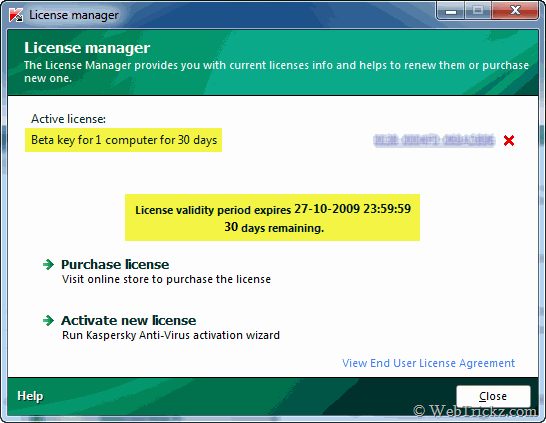
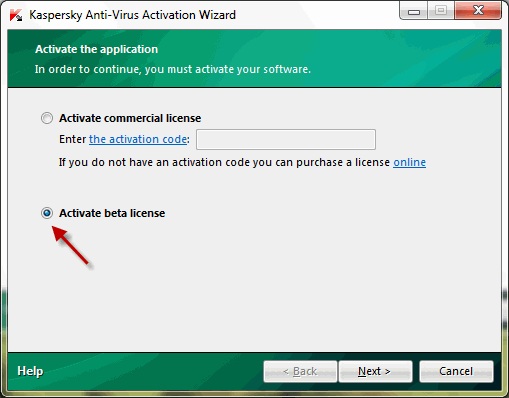
  7. Under License, Activate beta license then press Next and Finish (Delete any trial keys first if any, as they wont work).
  8. Re-enable Self-Defense from options.

  9. Now you have 30 days of beta license activated. After every 30 days, simply click Activate Beta (delete the expired beta key first) and enjoy another 30 days Free.

Kaspersky will now show as Beta Version though it is your final version only. Enjoy!

Update – How to delete the expired key > activate beta license ?

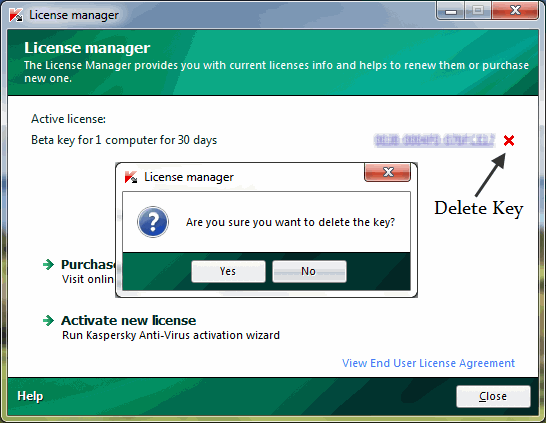
To delete beta key, open Kaspersky > License Manager and click on the red X (cross) next to the code. Then click on Yes button as shown in below image.


Now click ‘Activate New License’ option and then chose ‘Activate beta license’. Click Next to activate kaspersky.

Disclaimer: This article is for informational and educational purposes only. We advice you to purchase genuine license to run your software.

sumber

Older Posts